
Cashless payments make everyday purchases more convenient across Japan. PayPay offers smartphone payments at participating shops.
Registration and identity checks depend on your account and device. This guide covers eligibility, setup, funding, security, and overseas use.
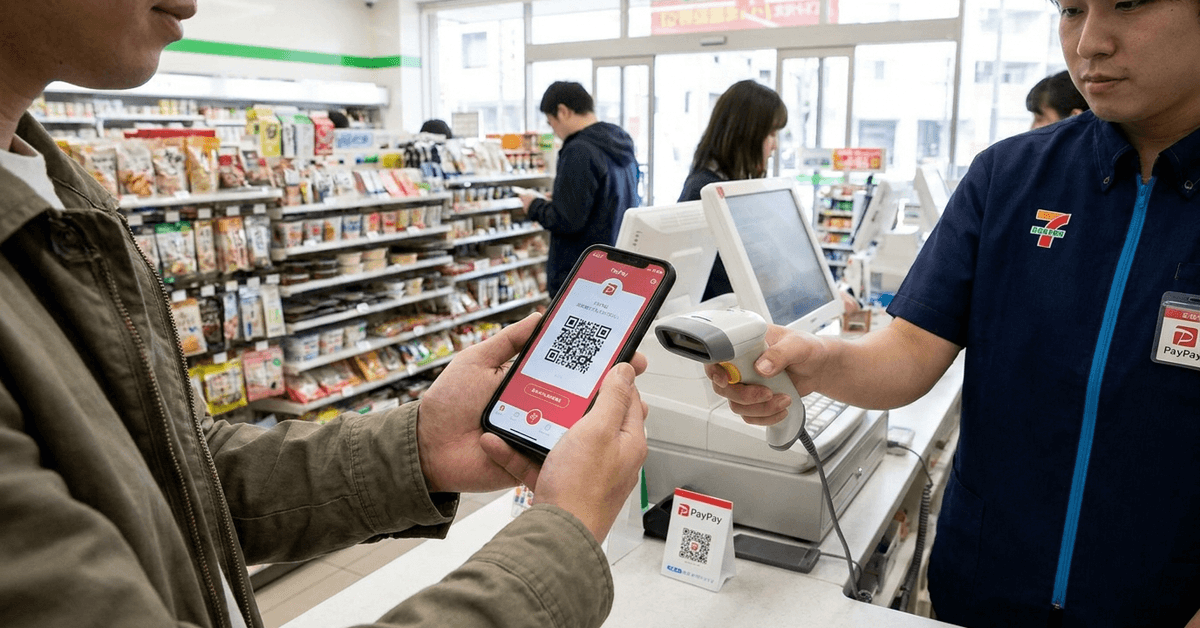
What Is PayPay and Why Is It Popular in Japan?
PayPay is a Japanese cashless app that supports barcode and QR-code payments at participating merchants. Users can track spending, send eligible balances, and receive promotional points under programme conditions.
Growing Trend of Mobile Payments
Mobile wallets have become familiar at Japanese restaurants, supermarkets, and convenience stores. Merchants display payment signs near registers. Rewards campaigns may encourage use, but availability and conditions change.
Key Benefits for Local Residents and Non-Japanese Users
Residents can use digital payments without carrying cash for every purchase. Transaction histories help monitor spending and confirm completed purchases.
Foreign residents can register with Japanese phone numbers, although verification and language support may require care.
Eligibility and Basic Requirements to Apply
A PayPay app Japan application requires an SMS-capable smartphone and a Japanese mobile number. Basic registration differs from identity verification, which unlocks additional account features and has its own requirements.
Supported Devices and Operating Systems
Download the app on a compatible smartphone running supported iOS or Android software. Tablets lacking telephone verification are unsuitable for registration. Check system requirements because older devices may lose support.
Required Documents and Information
Initial registration usually needs a Japanese telephone number and successful SMS verification. Identity checks may require a My Number card, Japanese driver's licence, residence card, or special permanent resident certificate. Since October 28, 2026, applicants must be at least twelve to request identity verification.
Step-by-Step: How to Apply for PayPay in Japan
The setup process begins with official installation and telephone verification. Anyone looking to apply for PayPay Japan should follow official instructions.
1. Download the PayPay App
Find the official application in Google Play or Apple's App Store. Check its developer information before downloading. Avoid modified packages or links from unexpected messages.
2. Initial Setup and Registration
Open the app and enter a Japanese number that can receive SMS. Enter the verification code using the instructions displayed. Overseas telephone numbers cannot be used for standard account registration.
3. Profile Creation
Check the account profile and add accurate personal information when prompted. An email address may help with notices and recovery. A Japanese email domain is not a registration requirement.
4. Identity and Security Checks
Complete identity verification to access features such as bank funding and certain transfers. The app may scan an accepted identification document and check matching personal details.
Foreign nationals can apply, but temporary residents must use an appropriate document to confirm residence validity.
5. Linking Payment Methods
Link an eligible bank after completing required identity verification, or add cash at supported ATMs. PayPay Card and eligible Sumitomo Mitsui cards have specific payment arrangements.
Most other credit cards stopped supporting direct payments in August 2026, and ordinary third-party cards cannot top up the balance.
6. Activating and Using the Wallet
To use PayPay in Japan, choose your payment method and follow scanning instructions. Some merchants scan your barcode, while others display a QR code for you to scan. Always verify the amount and successful payment confirmation before leaving.
Tips for Online Safety and Account Security
Account protection matters whenever a phone is used for spending. Use security settings and review payments rather than assuming every notification is legitimate.
- Secure your phone: Enable a screen lock and supported biometric authentication.
- Protect verification codes: Never share SMS codes or passwords with callers.
- Review activity: Check transactions and report unfamiliar payments promptly.
- Avoid suspicious links: Open the official app instead of following unexpected payment requests.
Understanding Fees, Limits, and Recharge Methods
Basic merchant payments and cash top-ups at supported ATMs are generally free. Bank withdrawals can carry fees, and transaction limits depend on account verification and funding type.
Supported Top-Up Methods
Funding options depend on whether identity verification has been completed. Confirm the balance category because not every type supports withdrawals or bill payments.
- Linked bank accounts: Add money through supported Japanese financial institutions after verification.
- ATM cash deposits: Use Seven Bank or Lawson Bank ATMs without needing an account there.
- PayPay Credit: Qualified account holders can use the linked credit arrangement under its terms.
- Incoming transfers: Receive eligible balances from other PayPay users when account rules allow.
Main Features and Unique PayPay Advantages
Users can access spending records, participating rewards campaigns, and peer-to-peer transfers under current conditions. Promotional points and lottery incentives are optional benefits, not guaranteed discounts.
Language and Customer Support
Some screens and support materials may be available in additional languages. Japanese remains important for certain identity, account, or customer-service processes.
Use official help pages if an unfamiliar message appears, and seek translation assistance without revealing credentials.
Where Can PayPay Be Used in Japan?
The wallet works at participating shops, including many restaurants, supermarkets, and small businesses. Look for the PayPay logo, then confirm that the merchant supports your selected balance or payment method.
Acceptance at transport services and vending machines varies, so carry a backup payment option. QR acceptance should never be assumed at every location, particularly for special payment types.
Frequently Asked Questions About PayPay Registration
These common questions cover banking, residency, international use, and telephone updates. Specific features depend on verification status and the account's current permissions.
Do You Need a Japanese Bank Account?
A bank account is not mandatory for initial registration. Cash can be loaded at Seven Bank and Lawson Bank ATMs. Some features, especially withdrawals, require identity verification and a linked account.
Can Foreigners Without Permanent Residence Register?
Eligible foreign residents can register accounts using Japanese mobile numbers. Permanent residency is not a universal requirement for identity verification.
However, applicants with limited residence periods must submit acceptable documentation verifying their status.
Is There a Charge for Using PayPay Internationally?
Verified users can make overseas payments at participating merchants in South Korea and Taiwan. Exchange rates, eligibility, and available services are subject to conditions.
Other destinations may offer restricted access, so review the overseas payment guide before travelling.
What Happens If My Phone Number Changes?
Update your registered number using official account procedures when possible. Losing SMS access can complicate sign-in and password recovery. Contact official support for help rather than creating duplicate accounts unnecessarily.
Conclusion
PayPay provides convenient payments at participating locations across Japan. Registration requires a Japanese number, while verification enables additional features.
Check current funding rules, fees, and merchant acceptance before relying on it. Protect account credentials and maintain a backup payment method.